JEE Main 2026 Login Errors issues, & difficulty while logging in are a bit concerning for aspirants. But there’s no need to worry as you can easily rectify it online. Students finding problems in accessing their JEE Main login password while downloading admit card can rectify problem through the recovery option provided on the website.
Are you looking for how to resolve JEE Main 2026 Login Errors? Check procedure below >>
NTA will release JEE Main 2026 admit card for session 1 and for session 2 in January and April. Admit cards can be accessed and downloaded online by logging in through the online website. After visiting the website, students will have to download the admit card by entering their necessary login details.

Confused? Ask your Queries Here
Continue reading the article, we have given the complete details on JEE Main 2026 login issues, how to resolve them, and the process for downloading and regenerating the login below.
Steps to Access JEE Main 2026 Admit card
Follow the given below steps to access your JEE Main 2026 Admit card:
- Visit the NTA website (Link will be provided below)
- Click on the link of ‘Download Admit Card’.
- Choose the appropriate option.
- Now enter your application number, password/DOB and security pin.
- Click on admit card tab to download your admit card.
- Keep admit card safe for other admission related procedures.
To get admission into various known Engineering institutions like IITs, NITs, and CFTIs, JEE Main 2026 exam must be cleared by the appearing candidates. Successfully qualifying students will be able to pursue B.Tech, B.E, B.Plan, and B.Arch programmes. Given below are the steps to recover your JEE Main 2026 Admit Card.
Admit cards will be available through online mode on the website. It is not released through any offline mode or sent by post. JEE Main 2026 session 1 admit card will be released in January 2026. It will be necessary for the candidates to bring admit card on the day of examination.
Check complete details that will be mentioned on admit card i.e. name of the candidate, roll number, photograph, signature, day and date of exam, examination centre etc. In case of any discrepancy in details contact the officials.
Candidates must bring one photo ID proof with their admit card. Without ID proof and admit card candidates will not be permitted to enter the examination hall.
Also Check:
How to Recover your JEE Main 2026 Password and Application Number?
Candidates who have forgotten their JEE Main 2026 Application number or Password or finding issues at the time of downloading it, need not panic. Students must follow the below steps for account recovery:
Password Recovery:
Step 1: Visit the JEE Main official page through – nta.ac.in and click on “I can’t access my account”
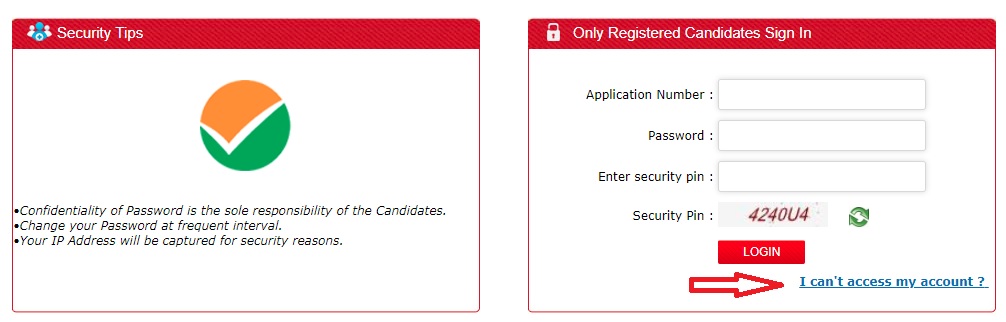
Step 2: Now candidates finding trouble in signing in have to select – I forgot my Password or I forgot my application number and click continue button.

Step 3: For Forgot Password Option: Candidates clicking on the option of forgot password will have to select one option for resetting their password –
- Using their security questions answered at the time of filling the form
- Using a verification code sent through a SMS to candidate’s Registered Mobile Number
- Using a reset link sent through an email to candidate’s Registered Email address

Step 4: If choosing option “Using a verification code sent through a SMS to candidate’s Registered Mobile Number”. The following page will open. Now enter your details to recover your password.

Step 5: Now, you will receive an OTP, in your registered mobile number.

Step 6: Enter the OTP (verification code) to complete the process.
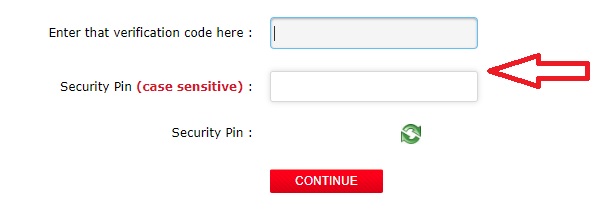
Step 7: Now, you can create a new password. This will be your new password.

Application Number Recovery:
For Forgot my Application Number: Candidates clicking on the option of forgot my application number must have to fill in the below details (as entered during registration) to recover their application number:
- Candidates Name
- Mother’s Name
- Father’s Name
- Date of Birth
- State of Eligibility
- Security Pin
To summarise, JEE Main 2026 Login & Password is an important detail which students should be aware of. While registration, students should carefully note down their login so as to avoid confusion in the future. Students will be able to access other services provided by NTA only if they have the valid JEE Main login.
For any further assistance regarding JEE Main 2026 Login Errors, you may leave your queries below.
I can fill right application number and password but he say that the application number and password is not valid
You must enter valid login details otherwise contact the officials regarding same.
I have given my correct login credentials, but still it shows that y password or I’d is wrong and it shows if the input is correct, then your date is is not still finalised by nta.
It might be some technical issue. You are advised to contact the officials regarding the same query.
I’ve submitted the credentials properly in my jee main score cardbbut it shows verification code is incorrect. In other devices it’s opening but not in mine .why?
You are advised to try again using different browser.
I wanted to change my password but after I click forgot password it shows nothing
It might be internet issue. You must try it later after sometime.
How to correction DOB.
Correction cannot be done now. Window to make correction is closed.
JE mains exam how can I change my exam paper medium from hindi to english,
Is correction window open
You are advised to wait for the authority to release correction dates & details.
I am an OBC NCL candidate but I don’t have certificate regarding this. Can I submit it later.
You are advised to submit it along with form submission.
Sir I have registered jee mains 2024 form, I also got the OTP in my gmail account but I didnt get the details regarding my application number.
(PLS NOTE THAT THERE IS A MESSAGE OF TICK WHICH APPEARS AFTER YOU VERIFY OTP AFTER REGESTRATION WHICH I DID NOT RECIEVE)
Please guide and also if i try to regester again with diff emailid phone no., i might get rejected ???
You are advised to contact officials for same.
Sir I have registered jee mains 2024 form, I also got the OTP in my gmail account but it’s been almost 2 day but I haven’t get the details regarding my application number.
Please help sir
You must provide valid mobile number. Otherwise register with the another number.
I am downloading my confirmation page nhi ho Raha hai dikha Raha hai login error for user 2023
Description or stack trace dikha Raha hai confirmation page download per click Karne par mujhe bataiye Mai nata ko e-mail karu please help me.
You are advised to contact officials.
I have my application number and password. But during login, it is showing that invalid application number Even though it is correct. I tried multiple times. What to do now?
Admit card is only out for exam on 24th January 2023. You must try to get your admit card later whenever it will be available.
It’s showing invalid application number plz help me
You must try it later after sometime.