CUET UG 2026 Application Form has been released on 3rd January 2026. It is a national level entrance exam that is conducted once every year. Exam will be conducted between 11th to 31st May 2026 via computer based test mode.
As CUET UG 2026 exam advisory is out! Update Aadhaar and fill form before last date >>
NTA CUET UG 2026 Application – Released
 CUET UG 2026 Registration has been started on 3rd January 2026. Check here for application details.

Still Confused? Comment Your Query Here.
About CUET Application Forms 2026, candidates are also intimated through email and SMS regarding the application form. Candidates are advised to take the printout of the filled-in application form.
NTA CUET UG 2026 Form Filling Procedure
Candidates can fill out the CUET application form 2026 after reading all the contents of information brochure. CUET (CUET UG) application process has been started and students must apply before the CUET 2026 registration last date – 30th January 2026.
Watch Video On Step-by-Step Guide to Fill CUET UG 2026 Application Form
How to Fill CUET 2026 Application Form
For CUET 2026 Registration, the applicants can fill out the application form through online mode. Candidates are instructed to fill out the application form carefully. The form filling procedure consist of nine stages.
- Step-1: Visit the Official Website
- Step-2: Register Online
- Step-3: Fill Registration Form
- Step-4: Login and Fill Application Form
- Step-5: LIVE Photograph & Image Uploading
- Step-6: Fee Payment
- Step-7: Confirmation & Print Application
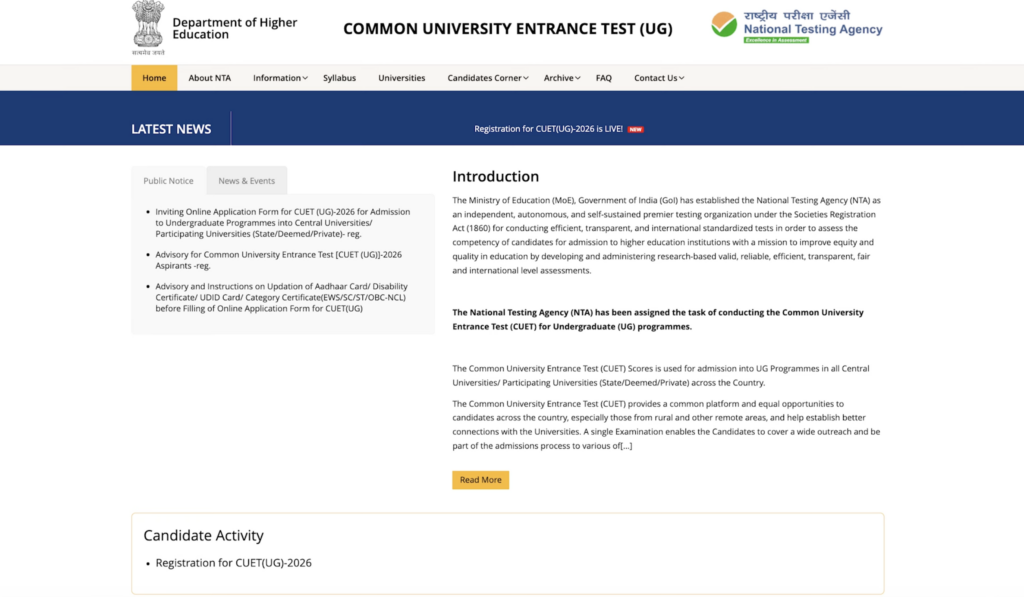
Step-1: Visit the Official Website:
- Visit the website link (Direct Link is given above).
- Click on ‘Registration for CUET (UG)-2026’ tab under Candidate Activity section on the website.
- On clicking apply button, you will reach the registration for UG, PG, and login link.
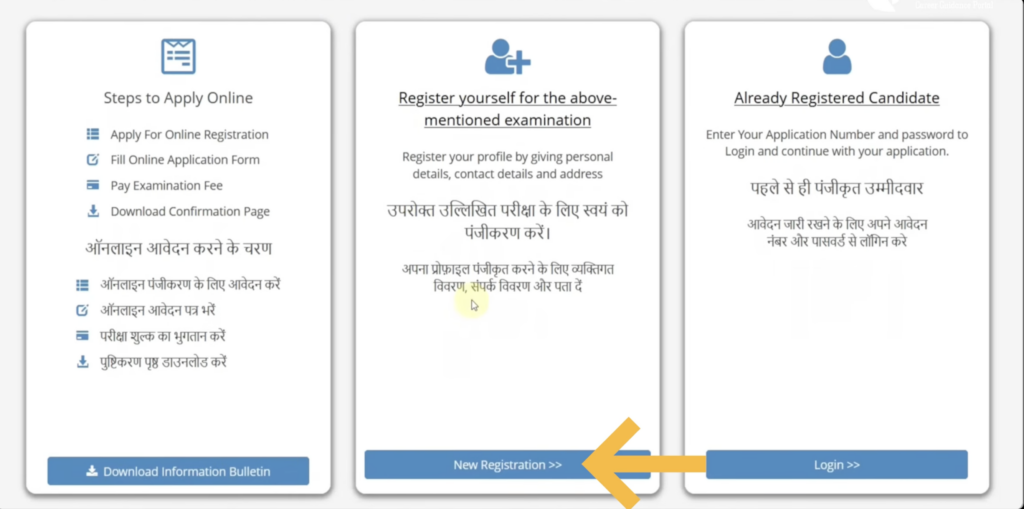
Step-2: Register Online:
- Three sections are provided on the page.
- In the first section, go through the steps to apply online and download information bulletin.
- Second section contains the tab mentioning to register for the examination. New candidates have to click on ‘New Registration’ option to fill form.
- Third section is provided for Already Registered Candidate. Here, students who have already filled form or have done basic registration and further login to proceed other steps of form filling.
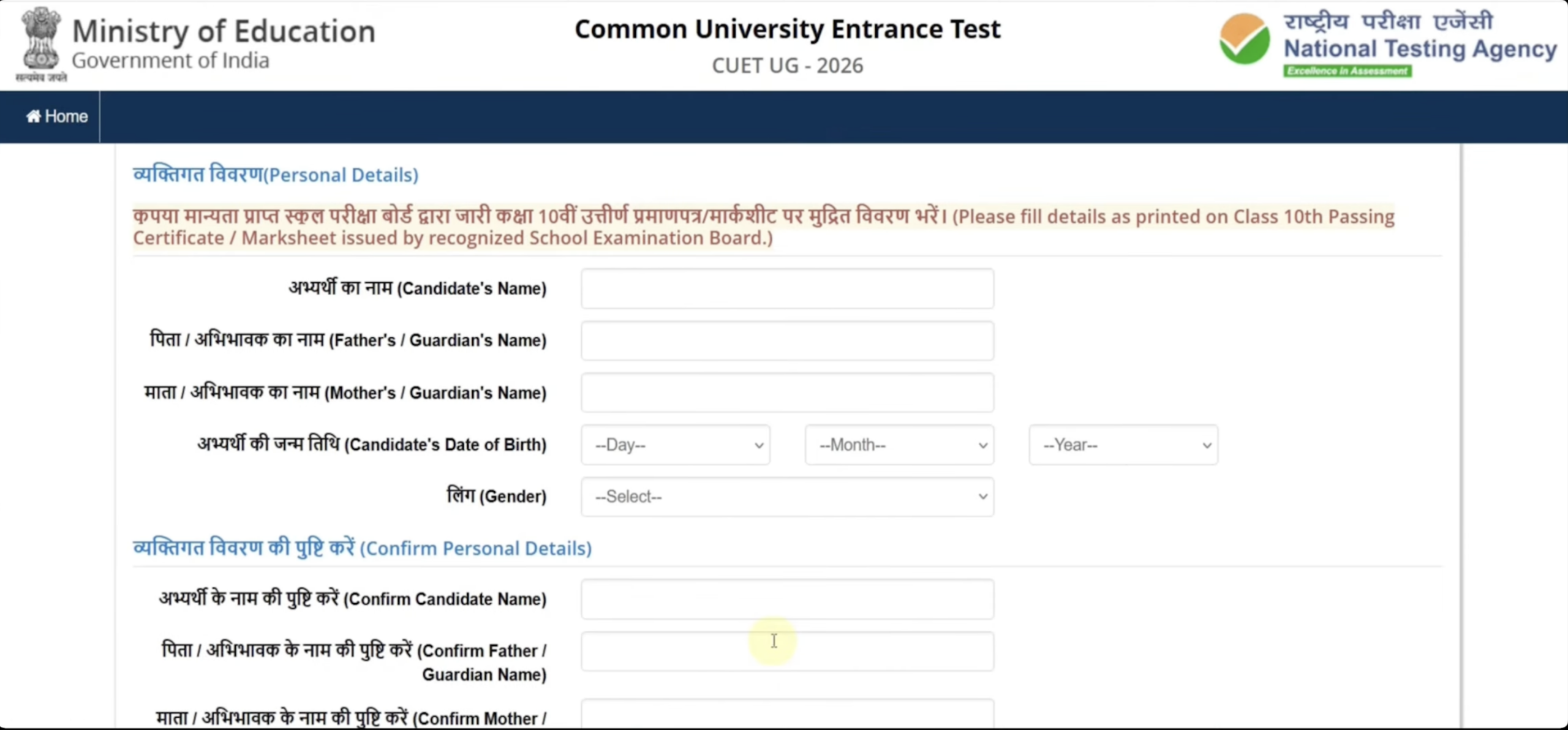
Step-3: Fill Registration Form
Next fill the basic registration details such as personal details, present address, communication address, etc. as stated below:
- Personal Details: Fill your personal details – Name, Father/ Mother/ Guardian name, DOB, Gender and confirm details.
- Present address: Next fill present address – premises no/ name, sub-locality, country, state, district, PIN code.
- Communication Address: Enter your email address, mobile number, contact no.
- Next enter permanent address or choose same as present address.
- Now, candidates have to choose password, select security question/ answer and enter CAPTCHA and submit.
- Confirm all the entered details in the form then tick ‘I Agree‘ and submit/ send OTP to verify mobile number OR edit registration form.
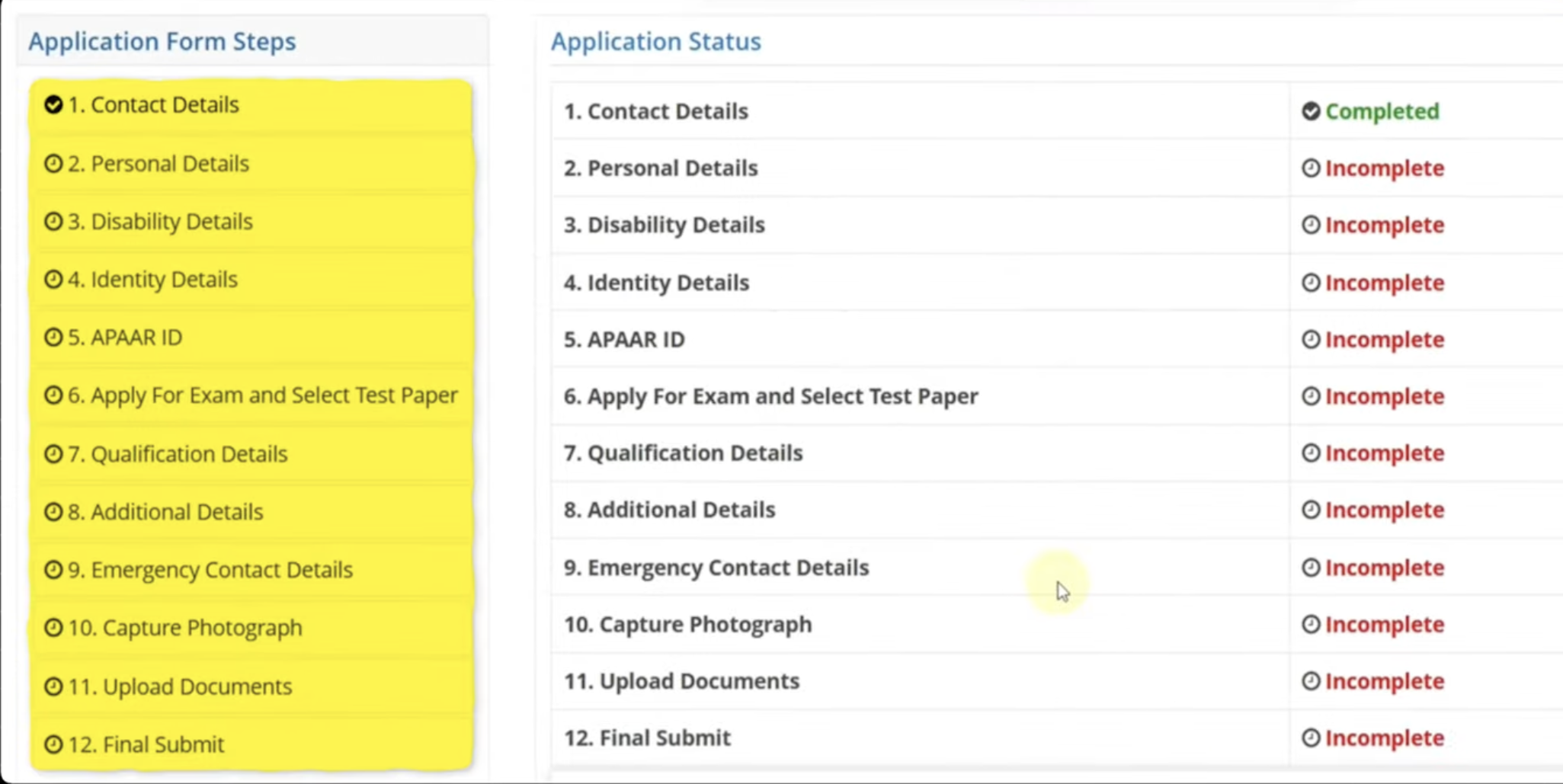
Step-4: Login & Fill Application form
Next, students have to complete the application form. Login with the provided details and proceed to fill details in the form:
- Personal Details – Select Nationality, domicile, category, residence, income, & other details, Save and Next.
- Disability Details – Enter required details if you are a PWD/ PWBD candidate – name, DOB, gender, etc.
- Identity Details – Choose Identity whichever Id proof you have. However, Aadhaar card is the safest option to choose. Then enter your Aadhaar number and confirm.
- APAAR ID – Enter APAAR ID details. Select Yes OR No option in this stage.
- Apply for Exam and Select Test paper – In the Apply for Exam and select test paper section, you have to choose max 5 test paper options. Note that you choose your paper according to qualifying eligibility.
- Qualification Details – Enter qualification details of 10th level – Pass status, passing/ appearing year, place of school, qualifying exam state, district, college/ school, board, result mode, enrolment no/roll no/reg no, school name and address, college PIN code. Now similarly fill the 12th level asked details,
- Additional Details – Select if you are twin and both are applying for CUET.
- Emergency Contact Details – Fill emergency contact details – country code, mobile number, email address and confirm with the OTP sent on mobile number and email id.
Step-5: LIVE Photograph & Image Uploading:
- Capture Photograph – Upload your LIVE photograph. Go through complete instruction given on the PAGE on upload your clear image according to format. After verifying, click on Save Next option.
- Upload Documents – Now students have to upload their documents – Passport size image, signature, and identity proof according to the specifications provided.
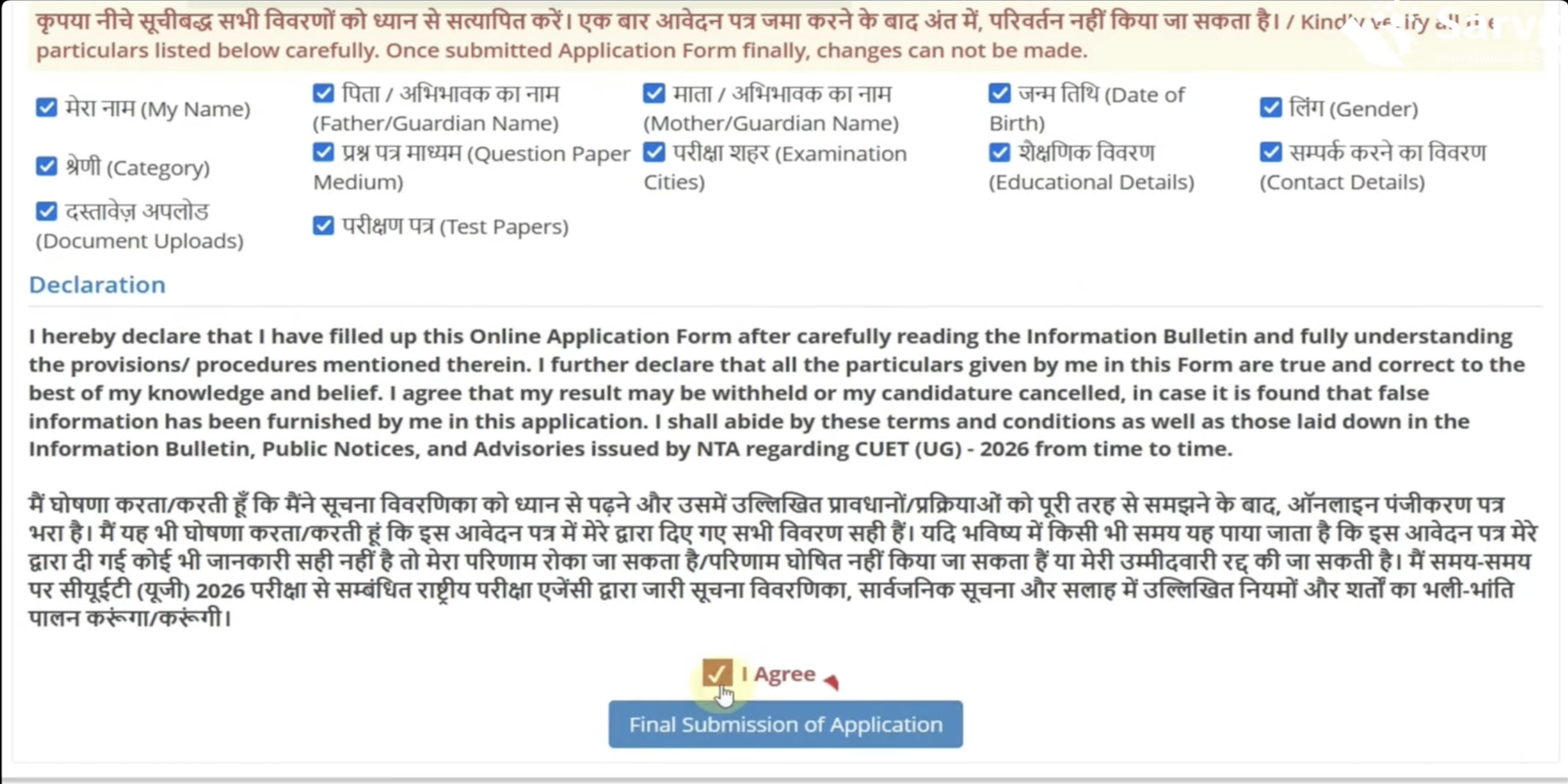
- Final Submit – On proceeding further, the preview option will be provided. Candidates have to go through complete details provided in the form, edit if required and finally preview complete application form. Click on ‘I Agree’ and submit form finally.
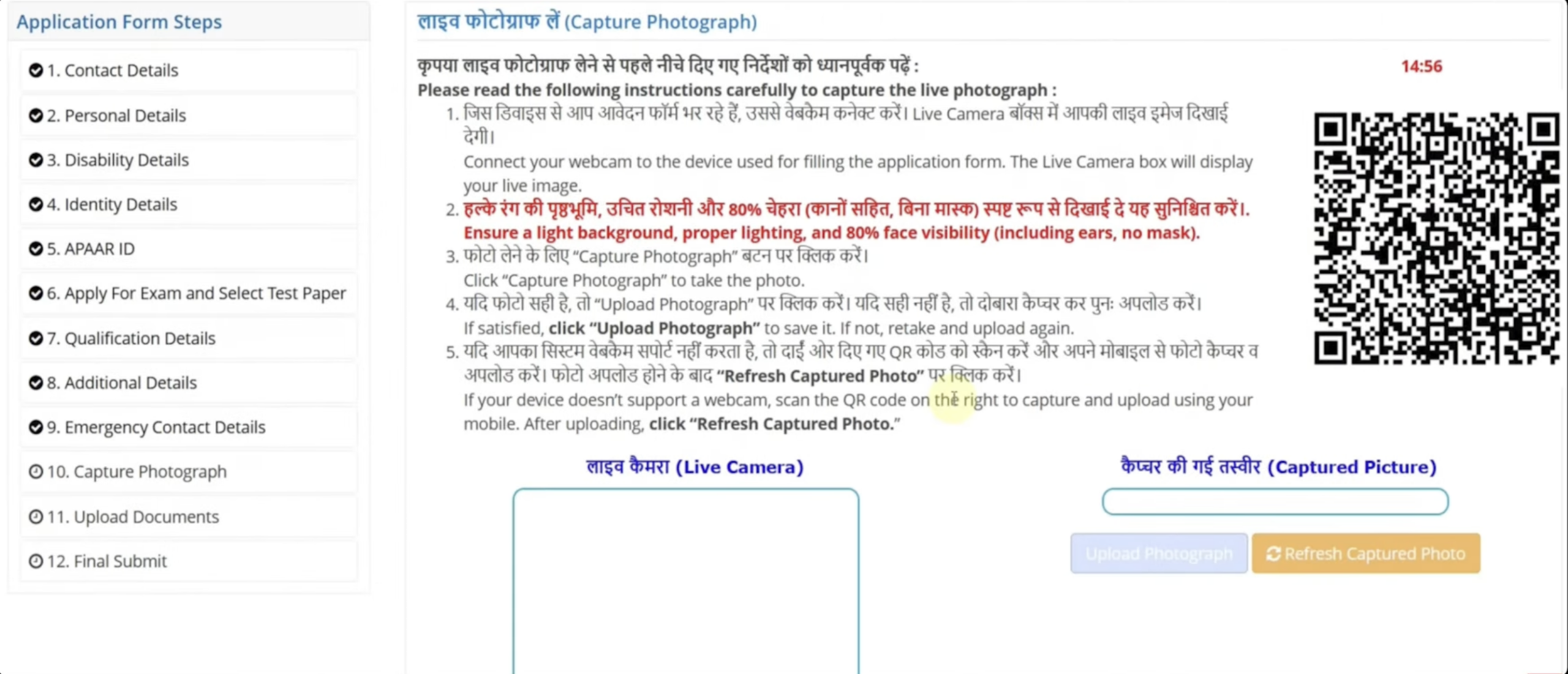
Image Specifications:
| Documents | Size | Format |
| Scanned Passport size Photograph | 10 to 200 kb | JPG/ JPEG |
| Signature | 10 to 50 kb | JPG/ JPEG |
| Scanned Copy of Disability /UDID Certificate | 50 kb to 300 kb | PDF format |
| Scanned copy of Identity Proof | 10 to 200 kb | JPG/ JPEG |
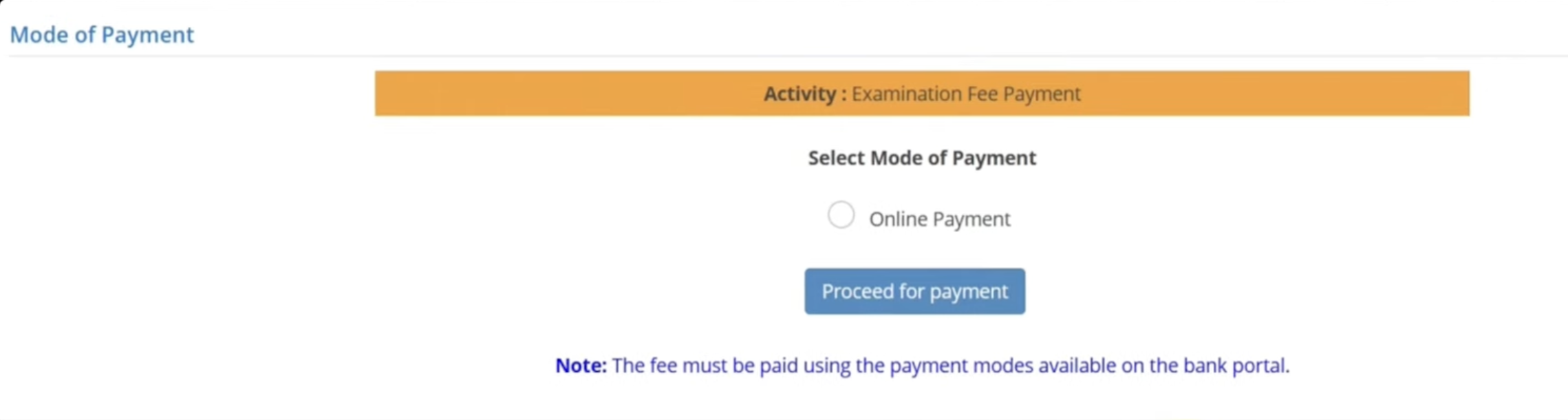
Step-6: Fee Payment:
- Payment of fee is the final step of form filling. Select the mode of payment and pay fee using the method of payment.
Step-7: Confirmation & Print Application:
- Confirm and then print the payment receipt and the application form for any references in the future.
NTA CUET Application Form 2026
Candidates can fill out the CUET application form 2026 after reading all the contents of information brochure. CUET (CUET UG) application process has been started and students must apply before the CUET 2026 registration last date – 30th January 2026.
Application Fee:
- Application fees can be paid through online mode. Any offline facility can not be provided.
- Application fees can be paid using debit card/ credit card, or net banking.
- Application fee is non-refundable.
- The application fee for different categories & both slots is as:
| No of Subjects | General (UR) | OBC-NCL/ EWS | ST/ SC/ PWBD /Third gender | Centres outside India |
| Up to 3 subjects | Rs. 1000/- | Rs. 900/- | Rs. 800/- | Rs. 4500/- |
| For each additional subject | Rs. 400/- each | Rs. 375/- each | Rs. 350/- each | Rs. 1800/- each |
Also Check:
| CUET Application Correction | CUET Admit Card |
Candidates should note that only those who meet the CUET Eligibility criteria are eligible to apply. Candidates are also required to follow application process guidelines set by the NTA while filling out the application form. If any candidate fails to follow the guidelines or is found providing incorrect information, their application may be rejected.
If you have any other queries regarding How to Fill CUET 2026 Application Form, you can write your queries in the given below comment box.
Cuet ig 2024 application form date to be released
Application window is open till 31st March 2024.
How many subjects we can choose
One can choose maximum upto 6 subjects.
As the servor is very slow today I(25.03.24) hence, I cannot fill up my application formi.e educationalqualification of parent and myself etc. Kindly intimate me about the extention of last date to apply the cuet-ug course.
We will update it in our article if authority will extend it.
I want to take admission in agriculture and technology
Sir maine signature blue ink se Kiya hai kya Mera form reject ho Jaye ga please reply
No, there will be not be any issue.
I have today after filled formed paid rs.2220.77 transaction id CPADQTDLP1 BUT PAYMENT SHOWING PENDING IN MY ID . PLS CHECK AND CONFIRM.
You are advised to mail this queries with officials.
Linked hai aadhar no subject bharne mai galti hai dobara sai bhar sakte hai
You must wait for the authority to release correction dates & details.
I want to take btech course from Delhi university but this option is not showing in the application form. Please advice
Registration for DU B.Tech admission is expected to begin from June 2024.
good
WHen CUET (PG) 2024 application forms will be released?
CUET PG 2024 application form dates & details are yet to be released.